Your Voice,
Reimagined with AI.
Clone a voice with consent, synthesize emotional speech with Piper, Kokoro 82M, Chatterbox, Chatterbox Turbo, and Qwen3-TTS, and edit non-destructively on your desktop — nothing is uploaded to the cloud.
Free & MIT open-source desktop app (v3.1.0). View releases
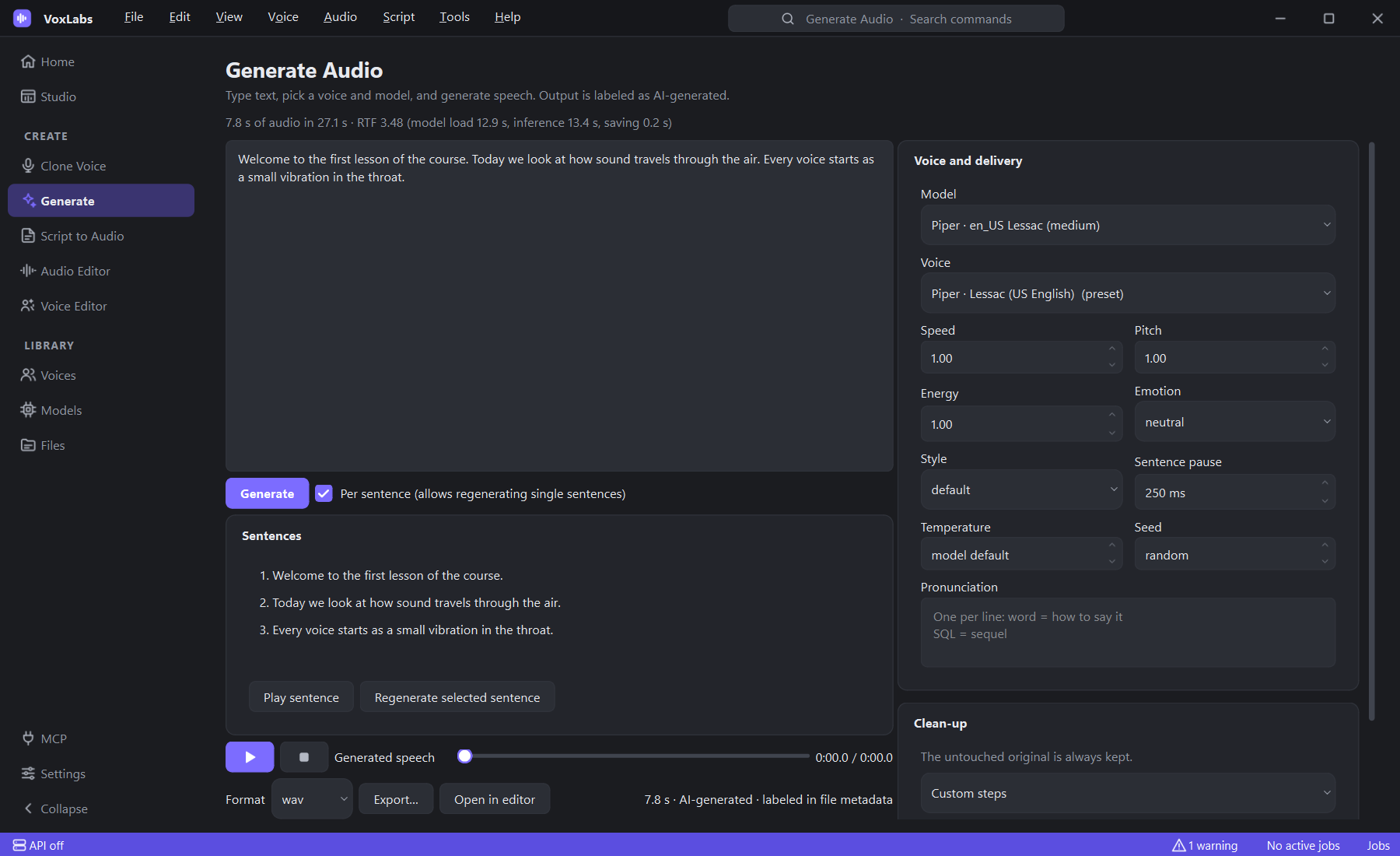
Sentence-by-sentence synthesis with inline emotion, custom pronunciations, and real-time factor metrics.
Why VoxLabs?
A complete local desktop voice studio for creators, educators, and developers who want expressive speech without sending audio to the cloud.
Generate speech with granular control over emotion, style, speed, pitch, energy, pauses, and custom pronunciations—with deterministic caching.
Clone a voice from a short reference sample with mandatory speaker consent. Revoking consent immediately deletes samples and voice profiles.
Turn multi-speaker scripts and chapters into narrated audio with per-section voice overrides, multiple takes, and unchanged-section caching.
Edit on a live waveform with instant undo/redo, plus an 8-stage DSP mastering pipeline (spectral denoise, RBJ EQ, de-esser, BS.1770 LUFS).
Run Piper, Kokoro 82M, Chatterbox, Chatterbox Turbo, and Qwen3-TTS 0.6B on your CPU or CUDA GPU. Nothing is uploaded unless you turn on an online engine.
Models load once and stay ready, idle models make room on the GPU, and Qwen3-TTS batches sentences. Every run shows its real speed, and Quality, Balanced, Fast and Low Memory presets fit your hardware.
One Library page lists everything VoxLabs keeps: generated, imported, processed and edited audio, every export wherever you saved it, and voice samples.
Claude Desktop, Claude Code and other MCP clients use 30 VoxLabs tools for speech, scripts, audio, files and models, and every call is logged on the MCP page.
Automate speech generation, script rendering and DSP enhancement from your own scripts through a localhost REST API that uses the same services as the app.
See It in Action
Real screenshots of the desktop app. One window for speech, scripts, editing, files and models.
Generate speech sentence by sentence, regenerate any one of them, and see the real speed of every run.
Supported Local AI Engines & DSP
Install lightweight CPU voices or full zero-shot GPU cloning models directly from the Models page inside the desktop app.
| Engine | Role | Download Size | Compute | Capabilities |
|---|---|---|---|---|
| Piper (en_US Lessac) | Local TTS | 63 MB | CPU / CUDA | Fast offline neural speech, zero VRAM required |
| Kokoro 82M | Local TTS | 330 MB | CPU / CUDA (~1 GB VRAM) | Expressive 82M-parameter model with built-in voices (af_heart, af_bella, bm_george) |
| Chatterbox TTS | Zero-Shot Clone & TTS | 3.20 GB | CUDA (~4 GB VRAM) / CPU fallback | Native emotion exaggeration, temperature control, and zero-shot cloning |
| Chatterbox Turbo | Zero-Shot Clone & TTS | 2.99 GB | CUDA (~3 GB VRAM) / CPU fallback | Faster Chatterbox for long narration; zero-shot cloning from a sample over 5 seconds |
| Qwen3-TTS 0.6B | Zero-Shot Clone & TTS | 4.15 GB | CUDA (~3 GB VRAM) / CPU fallback | Zero-shot cloning and 9 built-in voices across 10 languages in an isolated engine environment |
| VoxLabs DSP & MFCC | Audio Enhance & Profile | Built-in | CPU | 8-stage DSP chain (denoise, EQ, compressor, de-esser, limiter, BS.1770 LUFS) |
Works with Your AI Apps
VoxLabs is an MCP server. Claude Desktop, Claude Code and other MCP clients can generate speech, build and render scripts, process and export audio, browse your files and manage models, using the same features as the desktop app.
No window, no port
Your AI app starts VoxLabs by itself (
VoxLabs --mcp), so the desktop app doesn't need to be open. A local HTTP endpoint is there too.Every call is logged
The MCP page shows each call live, with its arguments, result or error and duration, plus all 30 tools and the ready-to-paste configuration for your install.
Consent stays human
Voice cloning is never offered to agents. Consent has to come from the speaker in the desktop app.
{
  "mcpServers": {
    "voxlabs": {
      "command": "C:\\Program Files\\VoxLabs\\VoxLabs.exe",
      "args": ["--mcp"]
    }
  }
}claude mcp add voxlabs -- uv run --directory /path/to/VoxLabs voxlabs-mcpThe MCP page in VoxLabs shows these with the paths of your own install and a Copy button. MCP documentation
How VoxLabs Works
Install the desktop app. Clone with consent. Synthesize locally. Your voice never leaves the machine.
Download
Install VoxLabs for Windows, macOS, or Linux. One app — no browser account, no cloud workspace.
Consent & clone
Record or import about 30 seconds of audio. Cloning requires explicit consent every time.
Synthesize
Type text, pick an emotion, and generate speech with control over speed, pitch, and energy.
Stay local
Audio is processed on your computer and labeled as AI-generated. Delete a voice anytime.
Frequently Asked Questions
Everything you need to know about running VoxLabs locally on your machine.
- Does VoxLabs run completely offline?
- Yes. VoxLabs is a native desktop application (PySide6) that runs locally. Local engines—including Piper, Kokoro 82M, Chatterbox, Chatterbox Turbo, and Qwen3-TTS 0.6B—synthesize speech and clone voices entirely on your computer without uploading audio to the cloud. Online engines (Microsoft Edge Neural and Google TTS) are disabled by default unless explicitly enabled in Settings.
- Which TTS and voice cloning models does VoxLabs support?
- VoxLabs supports Piper (63 MB fast CPU TTS), Kokoro 82M (330 MB natural CPU/GPU TTS), Chatterbox TTS (emotional zero-shot cloning), Chatterbox Turbo (faster zero-shot cloning for long narration), Qwen3-TTS 0.6B (multilingual zero-shot cloning and 9 built-in voices), MFCC pitch-matched voice profiles, and an 8-stage DSP audio enhancement engine.
- How does VoxLabs enforce ethical voice cloning and speaker consent?
- Every voice cloning operation requires explicit, attributed consent recording who granted permission and the speaker's name before any audio sample is processed. Every generated file is labeled 'AI-generated by VoxLabs' in its metadata and flagged ai_generated in the local database. Revoking consent immediately deletes the speaker's reference samples and voice profile from disk.
- Can I automate VoxLabs from scripts or AI agents via REST API and MCP?
- Yes. VoxLabs is an MCP server: Claude Desktop, Claude Code and other MCP clients start it with `VoxLabs --mcp` (or `uv run voxlabs-mcp` from source) and get 30 tools for speech, scripts, audio, files, models and performance settings. Every call is logged on the app's MCP page, which also shows the ready-to-paste configuration. An optional FastAPI server (127.0.0.1:8942 by default, with MCP at /mcp) serves scripts. Voice cloning is never offered to agents.
- Does VoxLabs require a GPU or FFmpeg?
- Neither is strictly required. Piper and Kokoro 82M run smoothly on a standard CPU. Heavier models (Chatterbox, Chatterbox Turbo, Qwen3-TTS 0.6B) prefer an NVIDIA GPU: when one does not fit, idle models are unloaded from the GPU first, and only then does it fall back to the CPU. Qwen3-TTS installs the PyTorch build that matches your GPU, and Settings → Performance recommends a preset for your hardware. WAV, FLAC, OGG, and MP3 work out of the box via libsndfile; FFmpeg on your PATH is only needed for M4A/AAC import and export.
- What operating systems does VoxLabs support?
- VoxLabs ships installers for Windows 10 or later (x64 Setup.exe or .msi, plus a portable .zip), macOS 13 (Ventura) or later on Apple silicon (.dmg or .pkg), and Linux x86_64 (.deb for Ubuntu 22.04+, .rpm for Fedora 39+, plus a portable .tar.gz), and can also be run from source on Python 3.12+ with uv.
Download VoxLabs
The product is a desktop application. Pick your platform and install — synthesis and cloning run on your computer.